You need a Lottie animation. You don't have a budget. Where do you go?
The honest answer is: it depends on what you're looking for.
- Want a quick generic animation? → LottieFiles
- Need polished UI icons? → Lordicon or useAnimations
- Saw a Lottie on a real site (Stripe, Linear, Notion) and want that one? → Extract it with MiroMiro ↓
Here's the full breakdown - five free libraries worth your time, plus the method most designers don't know about.
Why this list is shorter than most
Most "best free Lottie" articles dump 15+ libraries on you. That's not helpful. Half of them have 50 animations and the other half are just LottieFiles in a different paint job.
We tested every major library and kept the five that:
- Have enough volume to actually solve your problem (>1,000 free animations)
- Allow commercial use in their free tier (with or without attribution)
- Are still actively updated in 2026
If a library didn't clear all three bars, it's not in the list.
The 5 best free Lottie libraries
1. LottieFiles: the default starting point
The biggest Lottie library on the internet. 200,000+ free animations, a built-in editor, and direct export to JSON or dotLottie.
Best for: general-purpose animations, illustrations, hero graphics Free tier: unlimited browsing, daily download limit, commercial use allowed Watch for: popular animations get used on hundreds of sites, so your loading spinner won't be unique → lottiefiles.com/free-animations
2. IconScout: curated, higher quality
Smaller library but the average animation looks better. Strong for icon sets and UI micro-interactions where consistency matters.
Best for: icon animations, dashboard UIs, design systems Free tier: limited downloads per month, attribution required → iconscout.com/lottie-animations
3. Lordicon: animated icons that change state
The best library if you want icons that react - hover-to-morph, click-to-confirm, that kind of thing. Each icon ships with multiple animation states.
Best for: interactive icons, button feedback, navigation states Free tier: free with attribution, paid plan removes attribution → lordicon.com
4. useAnimations: UI primitives, MIT-licensed
Small, opinionated set of UI animations: loaders, checkmarks, hamburger menus, play/pause toggles. Genuinely free, MIT license, no attribution required.
Best for: app UI, micro-interactions, builders who hate license headaches Free tier: fully free, MIT license → useanimations.com
5. Lottielab: newer entrant, motion-tool-first
Lottielab is a motion design tool first, library second, but its free pack is solid and the styles are noticeably different from the LottieFiles aesthetic. Worth checking for animations that don't feel "stock."
Best for: motion-forward landing pages, designers tired of generic styles Free tier: free pack available, paid for advanced editing → lottielab.com
Do this on any live website
MiroMiro inspects any site in your browser - CSS, assets, colors, and clean code, one click away.
The method most designers miss
Libraries are great, but they have one fundamental problem:
Everyone uses the same animations.
That polished checkmark you grabbed off LottieFiles? It's already on 50 SaaS dashboards.
Here's what experienced designers actually do: extract Lotties directly from live websites.
That smooth scroll animation on Stripe. The icon transitions on Linear. The hero animation on Notion. They're all Lottie JSON files - and they're loaded into your browser the moment the page renders. Which means you can grab them.
How extraction works (60 seconds)
- Install the MiroMiro Chrome extension (free to install)
- Open any site using Lottie animations
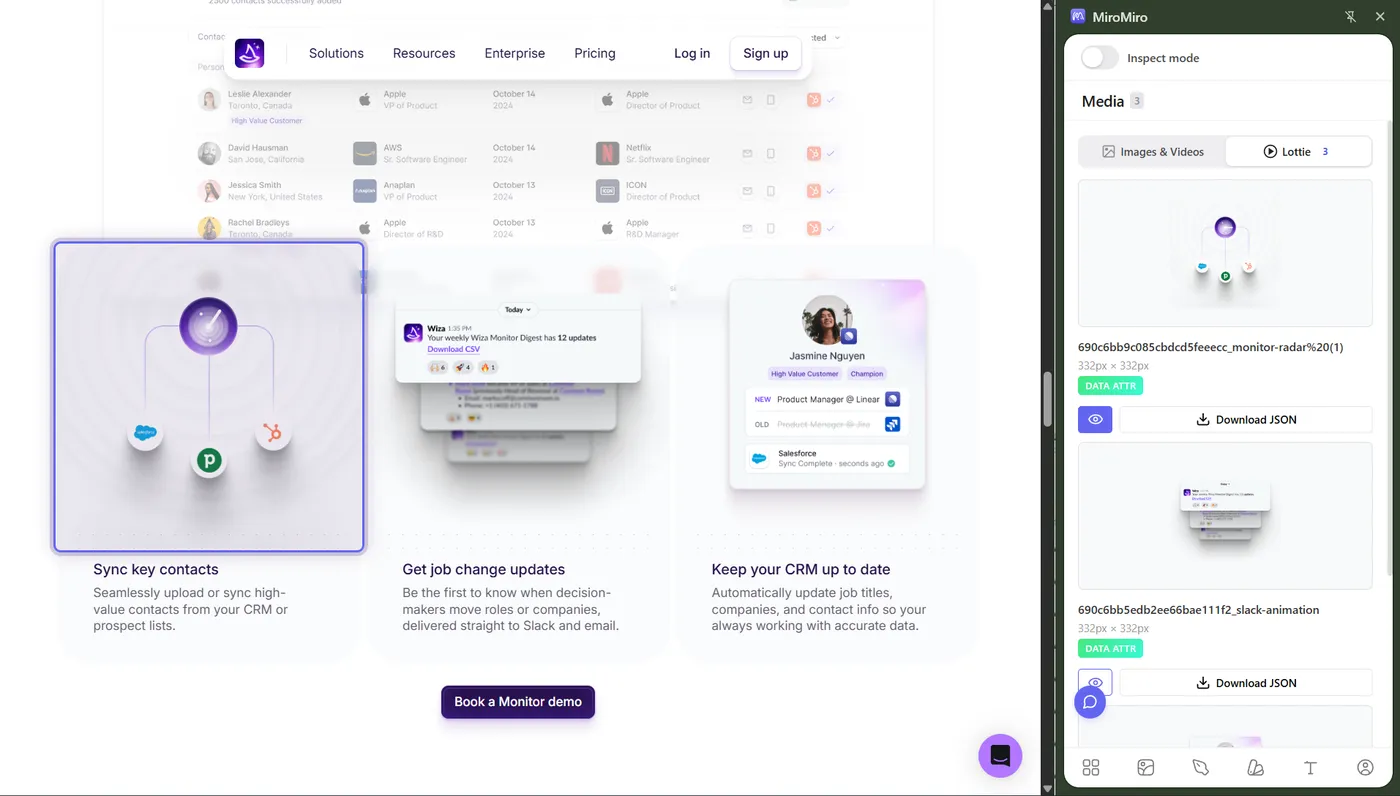
- Click the MiroMiro icon → Lottie tab
- Every animation on the page appears with a live preview
- Download as JSON or dotLottie - or test it instantly in our free Lottie player
Libraries vs. extraction: when to use which
| Libraries | Extraction | |
|---|---|---|
| Speed | Browse and download | Open the site, one click |
| Variety | What's been uploaded | Anything you've seen on the web |
| Uniqueness | Shared with everyone | Inspiration from real sites |
| Licensing | Clear (per animation) | Use as reference / inspiration |
| Best for | Quick generic needs | Specific animations you've seen |
The right answer is usually both: libraries when you need something fast and licensed; extraction when you need that exact thing you saw on a site you love.
Animations are also just one layer. The same one-click extraction pulls every image, SVG, and font on the page and the site's colors, fonts, and design tokens. And if you want this in a pipeline instead of a browser, the same engine runs as an extraction API.
Where to find sites with great Lottie animations
If you want to study how the best teams use motion, here's where to look:
- Stripe: subtle, polished micro-interactions
- Linear: clean icon animations, beautifully timed
- Notion: playful illustrations and onboarding
- Vercel: technical, developer-focused motion
- Framer templates: motion-heavy landing pages, almost all Lottie-driven
- Awwwards: filter winners by animation
Edit and convert your Lottie files
Once you have a JSON, you have options:
- MiroMiro's free Lottie Preview tool: play, scrub frames, change colours, isolate layers, export to GIF/WebM/PNG. No signup, runs in your browser.
- LottieFiles.com: free editor, change colours and timing
- After Effects + Bodymovin: for serious editing if you have the source
- Use directly on the web: Lottie Web Player, lottie-react, dotLottie
The lifetime math
€49
€69 now
€89
€149
The €49 launch price has ended. Lifetime is €69 until the current spots go , then it’s €89.
Your AI/design stack, monthly
- Cursor€20/mo
- Claude Pro€20/mo
- v0€20/mo
- Figma Dev Mode€15/mo
- MiroMiro Pro (monthly)€9/mo
Every year. Forever. Until you cancel.
MiroMiro lifetime - one-time
Paid once. Used forever. No renewals.
- Pays for itself in 8 months vs Pro monthly
- €39 saved in year 1 alone
- One less monthly bill in your stack, permanently
What to do next
Three paths depending on where you're at:
- Need a Lottie right now? → LottieFiles free animations
- Want to extract one from a real site? → Install MiroMiro (free to install)
- Already have a JSON and want to test it? → Free Lottie preview tool, no signup
Keep reading
- How to Download Lottie Animations from Any Website: full step-by-step guide
- Free Lottie Animations from Real Websites: curated index of bespoke Lotties from real production sites, downloadable in one click
- Lottie Preview Tool: test JSON files in your browser
- Lottie Animation Extractor: feature page
- Website Cloner: MiroMiro extracts more than animations, cloning whole sections of a live site into clean code
Ready to speed up your workflow?
Join 20,000+ designers and developers who save hours every week with MiroMiro.
Soraia · Founder of MiroMiro
Soraia builds MiroMiro, a Chrome extension used by 20,000+ designers and developers to extract clean code, design tokens, and assets from live websites. These guides come from testing the workflow daily on real sites like Stripe, Linear, and Vercel.
Follow on XDon't take our word for it
Not sure if MiroMiro is right for you?
Let your favorite AI do the thinking. Click a button and see what it says about extracting code, design tokens, and assets from any website.