
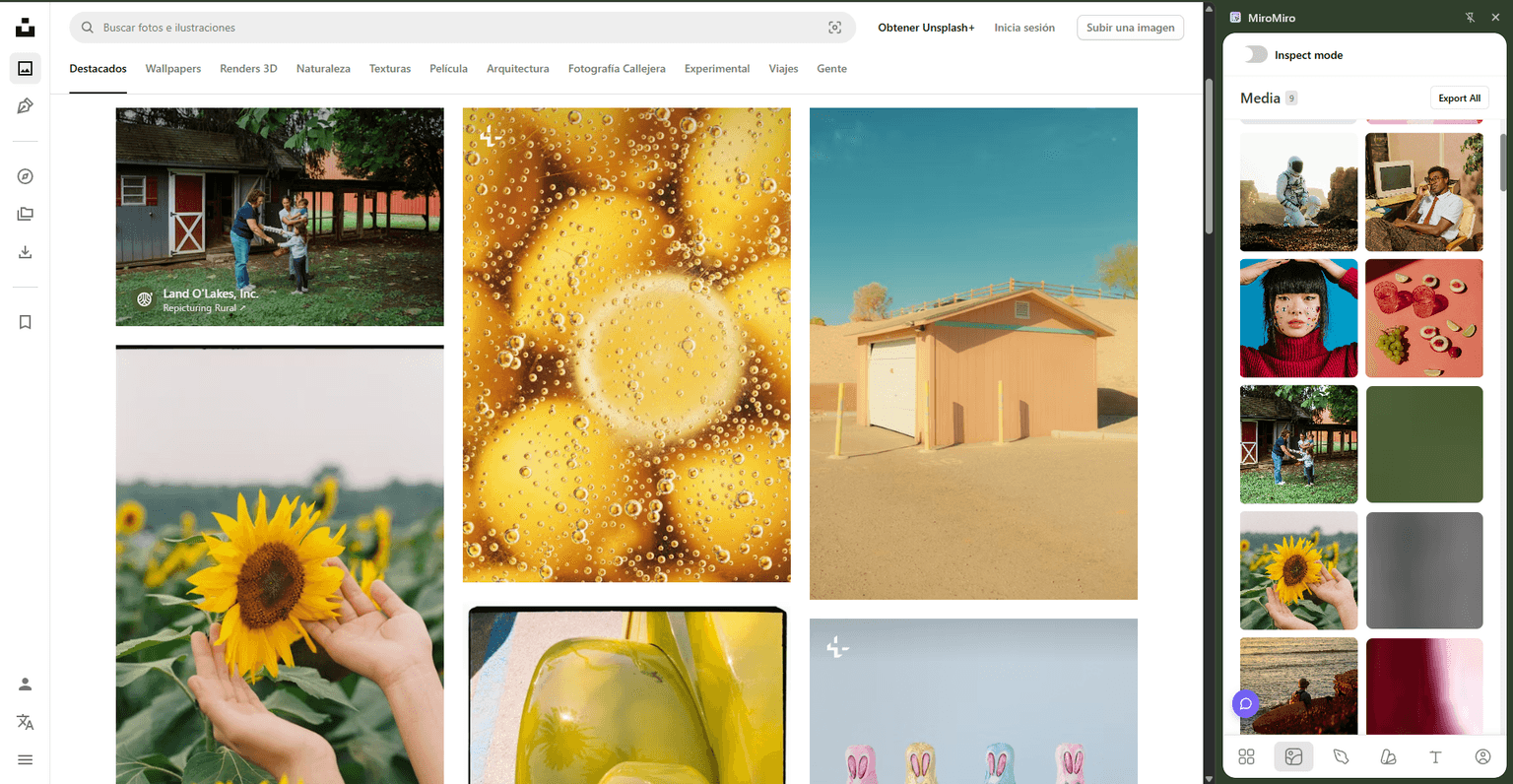
You find the perfect image on Unsplash. Click download. Suddenly you're staring at a sign-up wall, size options, and maybe an ad or two. You just wanted one image.
Or worse—you're on Dribbble. That beautiful shot you found? No download button. So you're opening DevTools, digging through the DOM, hunting for the actual image URL. All that for one file.
There's a better way. In this guide, I'll show you how to download images from any website—Unsplash, Dribbble, Behance, portfolio sites—with a single hover and click.
The Problem: Downloading Images Shouldn't Be This Hard
Let's be honest about what happens when you try to save images online:
Unsplash (Free, but Annoying)
- Sign-up walls before download
- Forced into size selection flows
- Tracking popups and email captures
- Multiple clicks for a "free" image
Dribbble (Even Worse)
- No obvious download button
- Full-size images locked behind Pro
- Right-click disabled on many shots
- Have to inspect element and find URLs manually
Portfolio Sites & Behance
- Right-click disabled "to protect work"
- Images optimized down to thumbnails
- No download option at all
- Manual screenshot = terrible quality
The Solution: Download Images by Hovering
MiroMiro is a Chrome extension that lets you download any image from any website by simply hovering over it and clicking.
No sign-ups. No inspect element. No workarounds.
- Hover over any image on a webpage
- Detect the highest quality version available
- Click to download instantly to your computer
- Works on Unsplash, Dribbble, Behance, portfolio sites, anywhere
Step-by-Step: Download Images from Any Website
Here's exactly how to use it:
Step 1: Install MiroMiro
Add the MiroMiro Chrome extension from the Chrome Web Store. It's free to install.
Step 2: Browse Any Website
Visit Unsplash, Dribbble, Behance, or literally any website with images you want to download.
Step 3: Hover & Click Download
Hover over the image you want. MiroMiro automatically detects it and shows you a download button. Click it, and the image downloads at the highest available resolution.
That's it. No extra steps.
Watch It in Action
See how fast it is to download images from Unsplash and Dribbble with MiroMiro:
Watch the full tutorial showing image downloads from Unsplash, Dribbble, and other sites.
Where This Actually Saves Time
Sure, Unsplash is convenient—but MiroMiro really shines on sites where downloading isn't straightforward:
1. Dribbble Shots
Dribbble doesn't make it easy to download shots at full resolution. With MiroMiro:
- Hover any shot
- Download it at display resolution
- No Pro account needed
- No DevTools digging
2. Portfolio Sites
Designers love disabling right-click. MiroMiro bypasses that entirely:
- Works even when right-click is disabled
- Grabs the actual image file, not a screenshot
- No quality loss from screenshotting
3. Behance Projects
Behance projects have dozens of images, but no bulk download:
- Hover and download each image individually
- Gets full-size versions
- Way faster than inspect element for each one
4. Landing Pages & Inspiration Sites
Building a swipe file? Researching competitors?
- Hover over hero images, icons, graphics
- Download reference images instantly
- Build your design library faster
5. Awwwards & Design Showcases
When you're collecting visual references:
- Grab screenshots and graphics on the fly
- No need to bookmark and revisit later
- Faster mood board creation
Is This Legal? Yes.
Important clarification: MiroMiro doesn't bypass paywalls or crack DRM. It downloads what's already visible and freely accessible in your browser.
Unsplash Example
Unsplash images are free under their license. You can:
- Download without attribution (though appreciated)
- Use commercially
- Modify and redistribute
MiroMiro just removes the sign-up wall. The images were already free—you're just getting them faster.
Copyright & Fair Use
Always respect copyright:
- ✅ Download for personal reference and learning
- ✅ Use licensed-free images (Unsplash, Pexels, etc.)
- ✅ Use for mood boards and internal design research
- ❌ Don't use copyrighted work commercially without permission
- ❌ Don't redistribute others' work as your own
MiroMiro is a tool. Use it responsibly.
What Else Can MiroMiro Extract?
Beyond regular images, MiroMiro can download:
SVG Icons & Logos
- Extract vector graphics at any size
- Download as clean
.svgfiles - Perfect for icon libraries
Background Images
- Grab CSS background images that aren't right-clickable
- Get hero section backgrounds
- Download texture images
Product Images
- High-res product shots from e-commerce sites
- Marketing graphics from landing pages
- Screenshot alternatives
Design Assets
- UI elements and components
- Illustrations and graphics
- Reference images from anywhere
MiroMiro vs. Other Methods
Let's compare the common ways to download images:
| Method | Speed | Quality | Works Everywhere? |
|---|---|---|---|
| Right-click Save | Slow | Medium | Often disabled |
| Inspect Element | Very slow | High | Yes, but tedious |
| Screenshot | Fast | Low | Yes, but poor quality |
| MiroMiro | Instant | High | Yes |
The verdict: MiroMiro is faster than right-clicking, higher quality than screenshots, and easier than inspect element.
Real-World Use Cases
Here's how designers and developers actually use MiroMiro:
Design Research & Mood Boards
"I'm building a mood board for a client project. I browse Dribbble, Behance, and Awwwards—hovering and downloading reference images as I go. What used to take 30 minutes now takes 5."
Competitor Analysis
"When analyzing competitor websites, I download their hero images, product shots, and UI elements. Makes it easy to compare visual styles side-by-side."
Building Icon Libraries
"I collect SVG icons from sites I admire. MiroMiro extracts them as clean vectors, which I organize into my personal library."
Client Presentations
"When presenting visual direction to clients, I grab real examples from successful brands. Way better than describing it in words."
Pricing: Free & Pro
MiroMiro has a free plan with generous limits:
Free Plan:
- Extract up to 15 assets per month
- Save up to 10 items to your library
- Perfect for casual use
Starter Plan ($9/month):
- 150 image/SVG extractions per month
- Save up to 100 assets to your library
- Ideal for active designers
Pro Plan ($19/month):
- 2,000 asset extractions per month
- Unlimited library storage
- For agencies and power users
FAQ: Downloading Images from Websites
Is it legal to download images from Unsplash with MiroMiro?
Yes. Unsplash images are free to download under their license, which allows commercial use without attribution. MiroMiro just makes accessing those free images faster—it doesn't bypass any paywall.
Can I download images from Dribbble without a Pro account?
Yes. MiroMiro downloads images at the resolution they're displayed on the page. Dribbble shows high-quality previews publicly, so you can grab those. However, always respect the creator's copyright.
Does MiroMiro work on sites with right-click disabled?
Absolutely. Many portfolio sites disable right-click to "protect" images. MiroMiro doesn't rely on right-click—it detects images via hover, so it works regardless.
What's the image quality like?
MiroMiro downloads the highest resolution version available on the page. If a site serves a 4K image, you get 4K. If it's optimized to 1080p, that's what you'll download. It grabs whatever the browser loads.
Can I download multiple images at once?
Currently, MiroMiro works one image at a time (hover → download). Bulk download is on the roadmap for a future update.
Does this work on mobile?
Not yet. MiroMiro is a Chrome extension, so it's desktop-only for now. Mobile support may come in the future.
Alternatives to MiroMiro
If you're exploring other options, here are similar tools:
Browser Extensions:
- Image Downloader (Chrome)
- Download All Images (Firefox)
- Save Image as Type (Chrome)
Limitations:
- Often require manual selection
- Don't work well on modern SPAs
- Less intuitive UX
DevTools Method:
- Free (built into browsers)
- Works everywhere
- Slow and technical
MiroMiro's advantage: Hover-based detection, instant downloads, works on any modern website.
Conclusion: Stop Wasting Time on Image Downloads
If you regularly download images from Unsplash, Dribbble, Behance, or any design inspiration site, MiroMiro saves you hours every month.
Quick recap:
- ✅ Hover to detect – No right-click needed
- ✅ One-click download – At highest available quality
- ✅ Works everywhere – Unsplash, Dribbble, portfolio sites, anywhere
- ✅ Respects licenses – Doesn't bypass paywalls, just removes friction
Over 5,000 designers and developers already use MiroMiro daily. Try it free:
Questions? Feedback? Reach out on Twitter or check out our other design tools.